
Getting Started with AI Agents: A Practical Guide for Small Business Automation

Listen to the podcast
Audio version of this article
Getting Started with AI Agents: A Practical Guide for Small Business Automation
AI agents are fundamentally changing how modern businesses operate. Instead of opening a chatbot, typing a single prompt, and manually copying answers across tabs, an AI agent takes a goal, utilizes connected tools, and autonomously carries out complex workflows.
The shift is clear: Chatbots answer questions. AI agents take action.
For small businesses, service providers, local operators, and growing teams, AI agents automate the repetitive tasks that consume hours each week—customer support, lead qualification, email follow-ups, scheduling, content planning, and daily business reporting.
This practical guide breaks down what AI agents are, how they work, how they differ from simple chatbots, and how to deploy your first agent successfully.
What Is an AI Agent?
An AI agent is an intelligent software system that leverages a Large Language Model (LLM) to reason through tasks, formulate multi-step plans, interact with software tools, and deliver business outcomes with minimal human intervention.
While a traditional chatbot responds to a single prompt like:
"Draft a follow-up email for this lead."
An AI agent executes an entire end-to-end workflow when given a directive like:
"Check new incoming leads, score them based on budget and urgency, draft tailored follow-up emails, and notify the sales team."
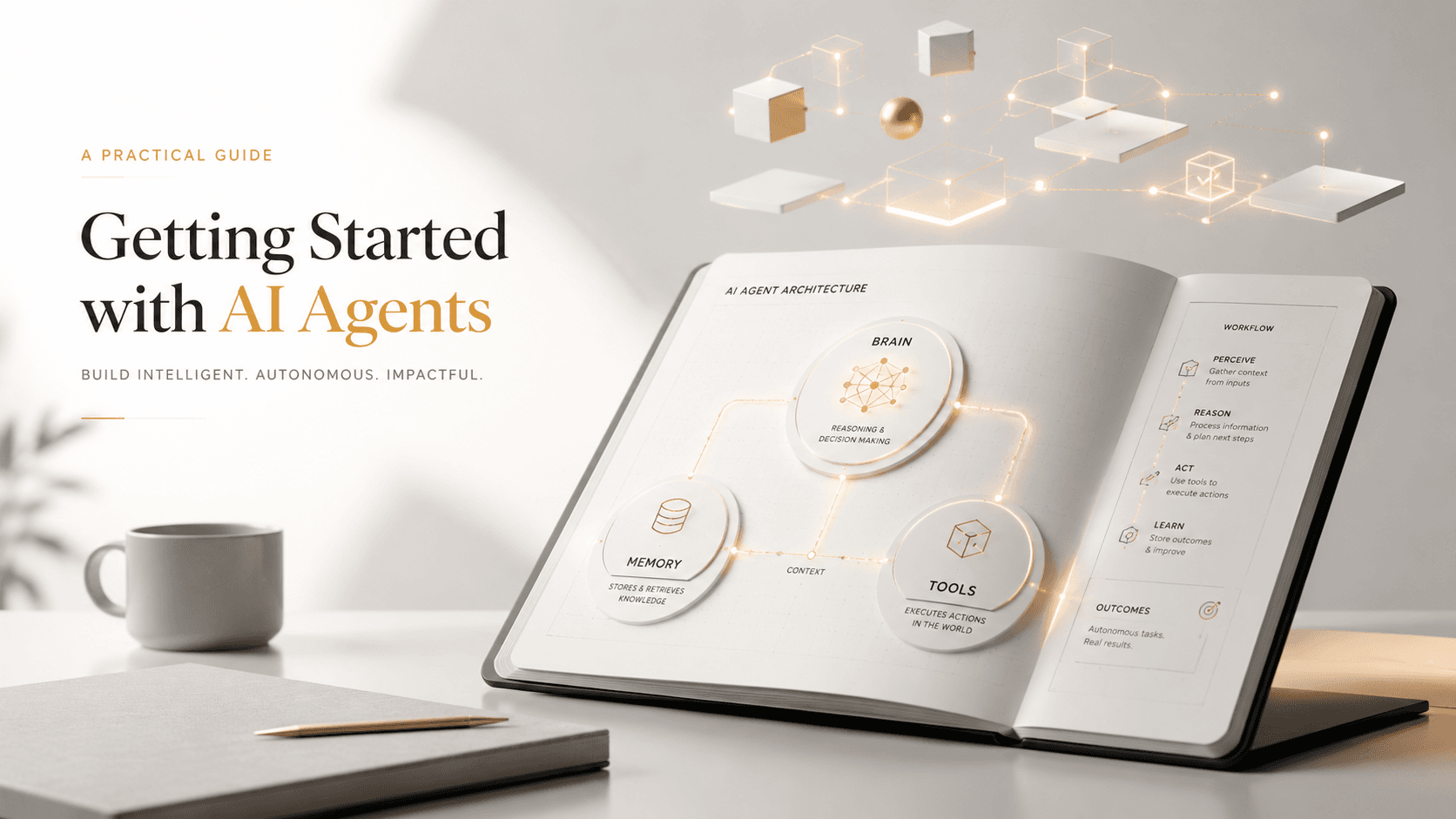
The Core Architecture of an AI Agent
Every functional business AI agent relies on seven core components:
- Goal: The specific outcome or task to achieve.
- LLM Engine: The reasoning core powering logic and decision-making.
- Instructions (System Prompt): Precise guidelines, tone, and operational rules.
- Business Context: Proprietary business data, service lists, FAQs, and brand guidelines.
- Tool Integration: APIs, databases, email services, web search, or local hardware resources.
- Memory & State: Awareness of past interactions and ongoing workflow status.
- Human-in-the-Loop Guardrails: Safety controls for reviewing sensitive actions prior to execution.
Ready to put AI agents to work?
Order your askingAi AI Agent Mini PC today and start from dedicated, always-on hardware.
AI Agents vs. Traditional Chatbots
| Feature | Traditional AI Chatbot | Autonomous AI Agent |
|---|---|---|
| Primary Role | Answers questions in real time | Executes multi-step workflows |
| User Effort | Requires continuous manual prompts | Operates on initial goals and triggers |
| Tool Usage | Isolated chat window | Reads databases, APIs, files, and scripts |
| Outcome | Static text response | Actionable business results & completed tasks |
| Execution | Manual copy-pasting required | 24/7 background & scheduled operation |
The 10 Essential AI Agents for Small Businesses
Small businesses can deploy specialized AI agents tailored to specific operational bottlenecks:
- Customer Service Agent: Answers FAQs, triages support tickets, and provides 24/7 coverage.
- Administrative Assistant Agent: Manages calendars, drafts emails, and triages inboxes.
- Bookkeeping & Invoicing Agent: Tracks payments, reconciles expenses, and prepares invoice drafts.
- Social Media Manager Agent: Plans content, drafts platform-specific posts, and monitors engagement.
- Inventory & Supply Chain Agent: Monitors stock levels, generates reorder alerts, and tracks shipments.
- Lead Qualification Agent: Evaluates incoming inquiries, schedules sales calls, and updates CRMs.
- HR & Onboarding Agent: Guides new hires through documentation, answers policy questions, and manages PTO requests.
- Marketing & Research Agent: Analyzes competitors, generates campaign briefs, and synthesizes market trends.
- Data Analyst Agent: Consolidates weekly metrics, traffic reports, and sales data into plain-English summaries.
- IT Support Agent: Handles password resets, tier-1 technical troubleshooting, and system checks.
Step-by-Step Plan: How to Build Your First AI Agent Workflow
To avoid overwhelm, follow this proven 5-step implementation roadmap:
Step 1: Pick One Repetitive Task
Start small with a high-frequency, low-risk workflow. Good example: Summarizing daily customer support inquiries every morning at 8:00 AM.
Step 2: Define the Agent's Specific Persona & Directives
Avoid generic prompts like "Help with marketing." Write explicit role guidelines:
"You are an AI Customer Support Specialist for askingAi.pro. Your job is to classify incoming messages into Support, Billing, or Sales, draft helpful initial replies using our FAQ doc, and flag high-priority issues."
Step 3: Supply Rich Business Context
Provide the agent with accurate business documents—your services list, pricing structure, refund policy, and brand voice guidelines.
Step 4: Establish Safe Human-in-the-Loop Guardrails
Allow the agent to perform research and draft outputs autonomously, but require human review before sending payments, publishing live posts, or emailing customers.
Step 5: Deploy on Always-On, Dedicated Hardware
AI agents work best when they run consistently without relying on an open browser tab or personal laptop. Running agents on dedicated local hardware ensures continuous 24/7 availability.
Ready to put AI agents to work?
Order your askingAi AI Agent Mini PC today and start from dedicated, always-on hardware.
Why Dedicated Hardware Matters for AI Agents
Running AI agents on local, dedicated devices provides major operational advantages:
- Always-On Reliability: Your agents remain active 24/7 even when personal laptops are closed or offline.
- Data Ownership & Privacy: Sensitive business data and customer logs remain under your local control.
- Cost Predictability: Avoid ballooning cloud compute fees by running local AI workloads on fixed-cost hardware.
- Dedicated Resource Allocation: CPU and memory are reserved strictly for your business automations.
Support & Scaling Options with askingAi.pro
Every askingAi AI Agent Mini PC includes a 12-month hardware warranty and email support. For growing businesses needing managed setups, optional monthly support plans provide token allocations and custom workflow building:
| Tier | Monthly Price | Included Monthly Tokens | Hardware Warranty | Support Level | Built-for-You Workflows |
|---|---|---|---|---|---|
| None | Included ($0) | — | 12-Month Hardware | Standard Email | Self-Service |
| Basic | $100/mo | 500 Million Tokens | 12-Month Hardware | Email, Phone, Remote | Custom AI Workflows Included |
| Pro | $250/mo | 2.5 Billion Tokens | 12-Month Hardware | Priority Support | Custom AI Workflows Included |
| Ultimate | $500/mo | 6.0 Billion Tokens | Lifetime Hardware | VIP Priority Support | Custom AI Workflows + Dedicated AI Email |
Final Thoughts & Next Steps
AI agents represent a practical leap from manual software usage to autonomous business assistance. By starting with one focused workflow, supplying rich context, and running your agents on dedicated hardware, your business gains a reliable 24/7 virtual employee.
Ready to put AI agents to work?
Order your askingAi AI Agent Mini PC today and start from dedicated, always-on hardware.
Related Articles
Continue exploring AI agents, automation, and small-business hardware.
Become part of our community


Join the many who have already joined our A.i Newsletter.